Rebuild my homelab, make no mistakes
I recently rebuilt my homelab: retired a single overloaded server, split storage and services onto separate hardware, and moved everything across. The twist is that I barely did it by hand. I handed most of the migration to an AI agent — gave it a clear goal and a hard set of guardrails — and spent my time verifying its work instead of typing the commands myself. This post is the journey and the lessons I took from it.
The old one-box: a server doing everything
For years, my homelab was the classic “converged server”: one overloaded OpenMediaVault box serving as NAS, media server, Docker host, and hypervisor. OMV was not the problem; I still appreciate how approachable it makes self-hosted storage. The problem was my implementation. I had let one aging machine accumulate too many jobs, so photos, videos, games, GitLab, CI/CD, and a dozen other services all depended on the same increasingly fragile box.
Two problems and one opportunity finally pushed me to rebuild. First, while an AI agent was setting up better backups, it discovered two disks were already failing — worn down by a misconfigured container spewing logs. Second, I had simply run out of capacity as I started shooting more video. Under both was the same design flaw: storage and services on one box meant every upgrade, repair, or rebuild risked taking everything offline. The opportunity was the agent itself. Having one on hand gave me the push to see whether it could handle the setup and migration for me.
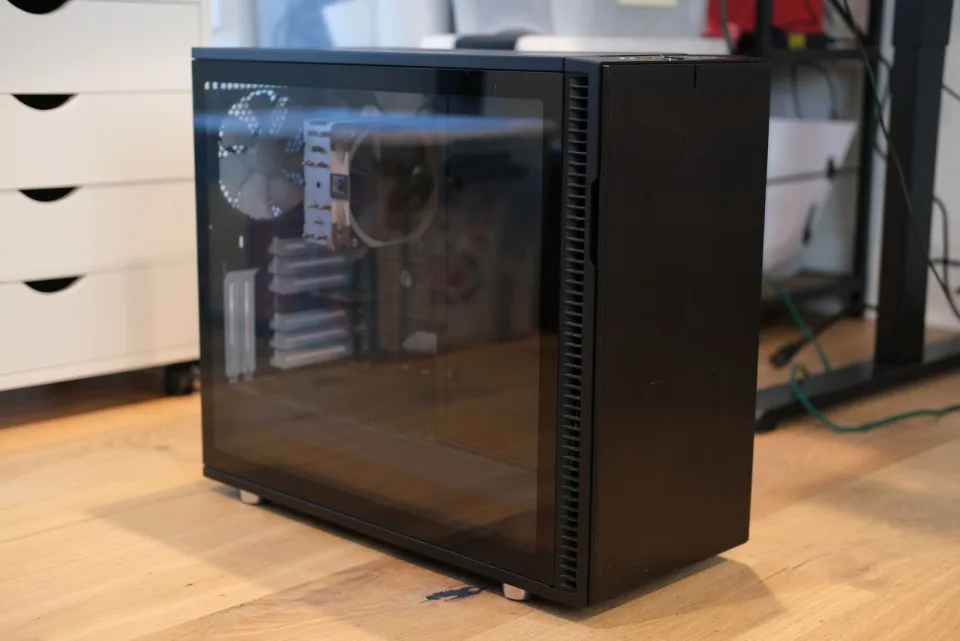
The old one-box homelab: a single aging OMV server carrying storage, media, Docker services, VMs, GitLab, CI/CD, and backups all at once.
The new setup
Before the parts list, the principles. I had a handful of goals for the rebuild, and they drove every choice that follows:
- AI‑native. I wanted the system legible and scriptable enough that I could offload routine management to an agent. More on how I used AI for this setup later.
- Infrastructure as code. No more hand‑tweaked config that’s impossible to replicate or back up.
- Open and free. I didn’t want any vendor lock‑in and pay premium to store my data and host simple services.
- Easy to service and upgrade. The one place I deliberately spent was the NAS — which, yes, cuts slightly against “free.” This was not a rejection of OMV; with better hardware and a narrower role, it could still have been a perfectly reasonable choice. What I needed most was better storage hardware: hot‑swap bays, a compact chassis, lower operational friction, and a purpose‑built appliance experience. A turnkey NAS makes adding capacity or replacing a failed disk a low‑drama operation instead of a weekend project.
- Lightweight and secure. Part of the point of a homelab is that you don’t have to pay a fat monthly bill just to serve a few standard web services to the public — as long as you can do it securely. So only what needs to be public is public, and the exposed footprint stays minimal.
I did some research and landed on the UGREEN NAS DXP4800 Pro, which happened to be on sale on Amazon. There are plenty of decent options, and comparing NAS systems isn’t the point of this post — but I’m very happy with this one. The UGOS it ships with (free, no strings attached) blew my mind, and the hardware quality is top‑notch. The services, meanwhile, split across two small hosts I already had on hand: one runs the Traefik gateway and my home services, the other is a dedicated home dev lab.
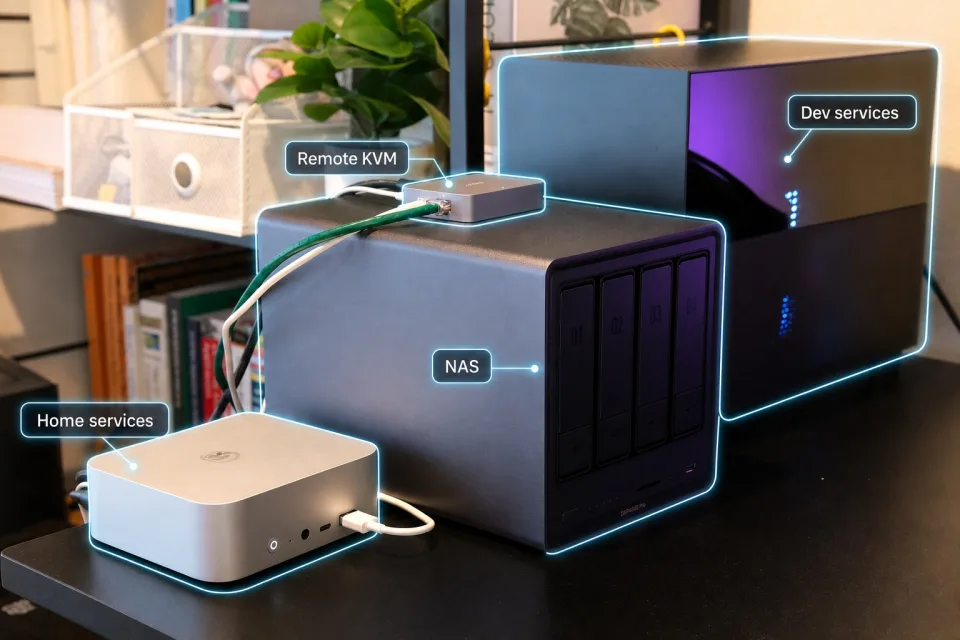
The rebuilt stack: dedicated NAS for storage, small service hosts for compute, and cabling simple enough to reason about.
Here’s the topology.
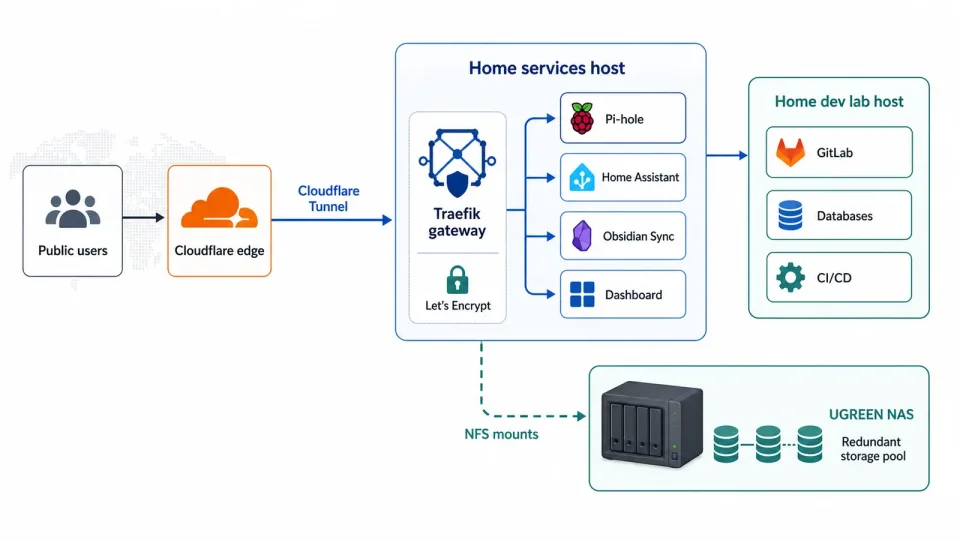
Final topology: Cloudflare Tunnel terminates at Traefik, services run on small hosts, and storage lives on the NAS over NFS.
The piece I’m happiest with is how everything gets exposed to the internet: a single Cloudflare Tunnel. No port forwarding, no static public IP, no inbound holes in the firewall. Compared to alternatives like Tailscale, it adds no overhead to my local network or my devices — things just work. The limitation, of course, is that it only handles a limited set of protocols, but I mostly just need to expose services over HTTPS, so it’s plenty for me. Traefik is the new gateway (replacing nginx), because it’s easier to manage. It proxies inbound traffic to the right upstream service inside my private network. Docker Compose provisions the container‑based services; it has worked really well for a setup this size and made migrating my existing services much easier. For mounting the NAS shares I settled on NFS — though, as you’ll see, I tested SMB along the way before switching. Ansible is the IaC tool for provisioning and configuring everything local, and OpenTofu manages the cloud side — the Cloudflare tunnels and DNS.
“Migrate everything, make no mistakes”
Setting up the new hardware is the fun part; the real work is moving my existing stuff onto it without breaking anything. A single wrong command could delete my entire photo library or wipe the code on my private GitLab server. By hand this would have eaten a whole weekend, probably more. Let’s see how much it took with an agent’s help.
Capable as today’s agents are, using one reliably — as in, without losing any data — still takes a few key decisions up front, so you set the right expectations and boundaries for it to work within.
The first decision is the overall migration strategy. On the old box, there were two kinds of things to migrate:
- Assets — documents, photos, videos, backup blobs: mostly static data, and perfect candidates to move onto the NAS.
- Container‑based services — the load balancer, home automation, the ebook server, GitLab: these carry dynamic application state and expose service endpoints.
I split the work into two phases.
- Phase one copies all the static data to the NAS. I chose to copy rather than physically move the drives, so that every step stays reversible if something unexpected forces a rollback — and so I could take the chance to reorganize the data along the way. It’s a long‑running, low‑risk operation, exactly the kind of thing I can let the agent drive without watching.
- Phase two migrates the services. This is much more complex and risky, but it takes less time, so I could keep an eye on the agent while it ran.
In both phases I followed the same approach with the agent:
- Initial plan. Tell the agent what you need done and ask it to write a complete plan in plan mode.
- Refine the plan (iterate). Review the draft, clarify anything ambiguous, and ask for more detail until the end-to-end path and outcome are clear.
- Smoke-test the risky parts (iterate). For any complex step, ask the agent to validate it first and record the test steps, outcomes, and findings.
- Finalize the plan. Have the agent merge the plan and smoke-test results into a new document, not revise the old one. In-place edits tend to carry stale context forward and make the note noisy. I ask for a step-by-step, verifiable plan with a findings field under each step, so the final doc doubles as an operational log: what happened, what changed, and what’s left.
- Execute. If the plan is solid, I mostly just watch the agent work — or get pinged when it’s blocked. My standard prompt for this is a saved
/goalcommand: execute the plan until it’s done, or until you hit something that genuinely needs me to unblock you.
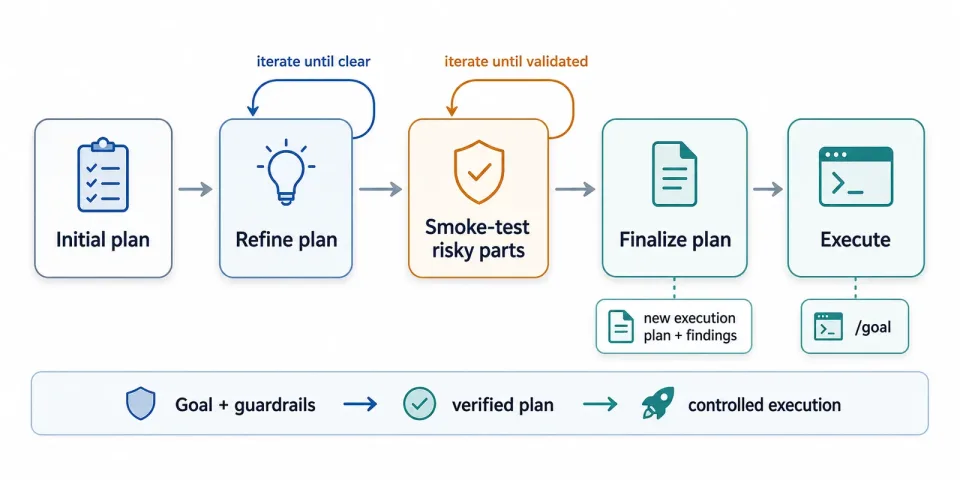
The control loop I used with the agent: plan, iterate, validate risky steps, then execute from a clean operational plan.
Phase 1 - Copying and reorganizing the data
The old server held a lot of poorly organized files — literally more than ten years of data, consolidated from a series of backup disks over the years. So I took the opportunity to ask the agent to help me build a mapping table that reorganized everything into a cleaner folder structure — part of the planning loop.
Once I was happy with the replication plan, I had the agent run a small batch of files to test it — the smoke‑test loop. It found and fixed two significant issues that would otherwise have made the whole migration far slower.
The first was finding the right transport. The agent worked through two dead ends before landing on the right approach:
- rsync over a mounted SMB share worked but crawled — every small file turned into a synchronous round‑trip, and throughput swung between 7 and 52 MB/s. Abandoned.
- rsync over SSH was broken on the NAS firmware, which ships a wrapped rsync that tries to
seteuid(root), fails, and rejects the destination. The agent diagnosed this from the actual error output rather than guessing. - The vendor’s rsync daemon won — and once it switched, throughput jumped.
This is the part where I had to babysit the agent to unblock it. For instance, it had no way of knowing that the NAS uses a vendor‑specific rsync implementation that I have to enable from the UGOS control panel. Left alone, the agent would go a long way trying to unblock itself — and burn a lot of tokens in the process.
Then it found the next bottleneck on its own: the old box had two NICs on the same subnet, and the kernel was routing NAS traffic over the 1 Gb link instead of the 2.5 Gb one. Agent asked my approval to apply a quick fix to add a specific host route. Throughput climbed to 150–190 MB/s, and the job became limited only by how fast the old spinning disks could be read.
Once the smoke test passed, I had the agent rewrite a clean plan and then turned it loose with /goal. The execution discipline is what sold me. The transfers ran sequentially under nohup so they’d survive an SSH session dropping; a supervisor auto‑retried any incomplete job up to three times; and a check‑in reported progress every two hours through a locked‑down, read‑only SSH key. The whole run took about 17 hours, almost none of it my time. When it finished, an independent dry‑run reported zero pending files — source and destination matched byte‑for‑byte. I went to bed; the agent moved all of it and checked its own work.
Phase 2 - Migrating the live services
Before the step‑by‑step, here’s the shape of the change at a glance. The starting point was the converged box — one server behind a single tunnel, services and storage sharing the same aging disks:
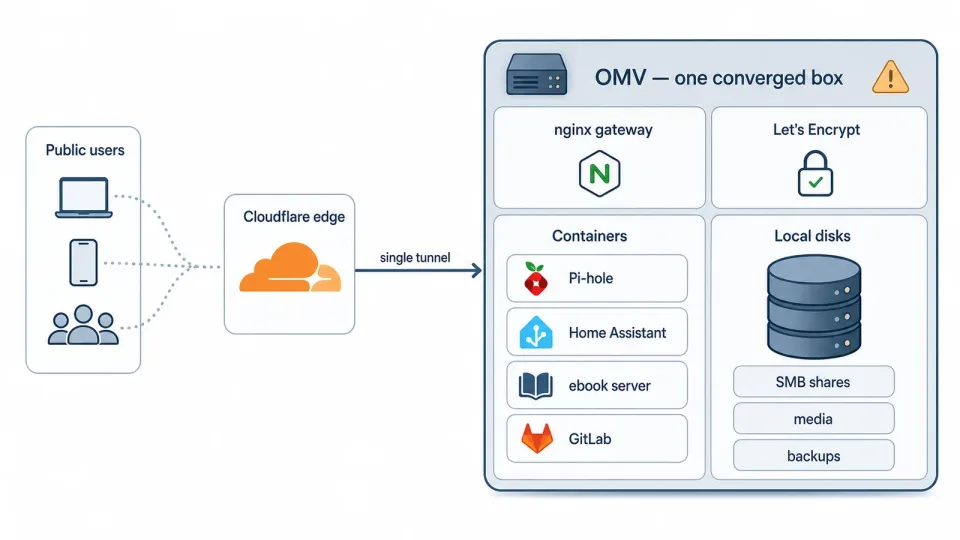
Before the rebuild, one OMV box carried both storage and services behind a single public tunnel.
A big‑bang switch was too risky, so the cutover ran with both tunnels live at once — moving one hostname at a time and parking the old routes for instant rollback:
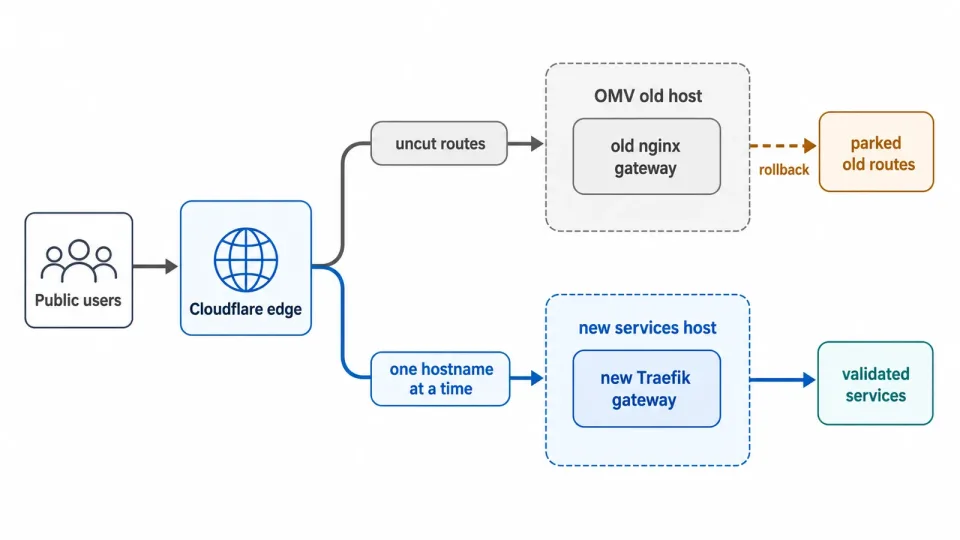
During cutover, both paths stayed live so each hostname could move independently with the old route preserved for rollback.
That’s the destination. Getting there started with hardware: before any of this could happen, I needed a new physical box to migrate to. Could the agent install a server from scratch on bare metal? Turns out it can. With a remote KVM device you can control a machine before it has even booted, and the agent can then use its Computer Use skill to drive the bare‑metal server through the OS install.
Installing the new server over a remote console
Standing up the new host meant a fresh Ubuntu Server 24.04 LTS install on bare metal — normally a keyboard‑and‑monitor job. The machine was plugged into a remote KVM (a device that exposes a machine’s screen, keyboard, and mouse over the network, GL.iNet KVM is the one I used). I pointed the agent at it, told it I’d attached a boot disk, and asked it to drive the installer to completion.
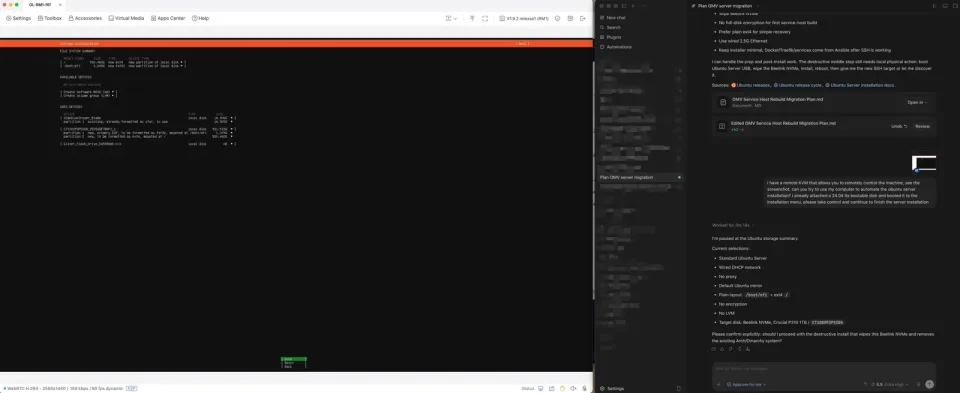
Installing Ubuntu Server through a remote KVM: the agent could drive the installer, but stopped for destructive confirmation and secrets.
It worked through the installer screens, confirming each choice — Standard Ubuntu Server, wired DHCP, an ext4 layout, targeting the machine’s NVMe — and stopped to ask me before the destructive step that would wipe the disk. It also paused at the screen where I needed to enter the admin password.
Cutting the services over
This was another repetitive, long-running job, so I followed the same pattern: plan, refine, validate, finalize, then execute.
In the validation loop, the main things I wanted to confirm were the new Traefik gateway setup and the automated traffic cutover. The agent proved the new path worked on disposable resources: a throwaway tunnel returning HTTP 200, ACME certificate issuance working through that tunnel, and infrastructure‑as‑code able to create and tear down a test tunnel. Validate the dangerous mechanisms in a sandbox, then build the real thing.
The migration execution then followed the same loop for every service: inspect the source config, stop only that one stack, take a checksummed cold backup to the NAS, restore onto the new host, deploy via Ansible, validate on the LAN — then leave the old stack stopped but its data intact as a rollback. One service at a time, each independently reversible.
Not everything went cleanly, and that’s exactly where the agent earned its keep. After I moved Pi-hole, for my private DNS, the replica looked healthy at the Docker layer, but DNS would intermittently drop because the FTL engine inside the container kept stopping. The agent dug in and traced it to nebula-sync: under certain conditions, the sync process would clobber the running Pi-hole and take it down. Once we understood the root cause, we put both Pi-hole and nebula-sync under Ansible management so their config and lifecycle were deterministic instead of racing each other. That kind of slow, evidence-based root-cause analysis is exactly the tedious work I was glad to hand off.
The public cutover was the most careful part. The new tunnel was provisioned with OpenTofu, but the existing one had no IaC behind it, and I didn’t want to risk corrupting a working config — so the plan was to edit the old tunnel by hand in the browser to switch traffic over, one route at a time. It worked perfectly.
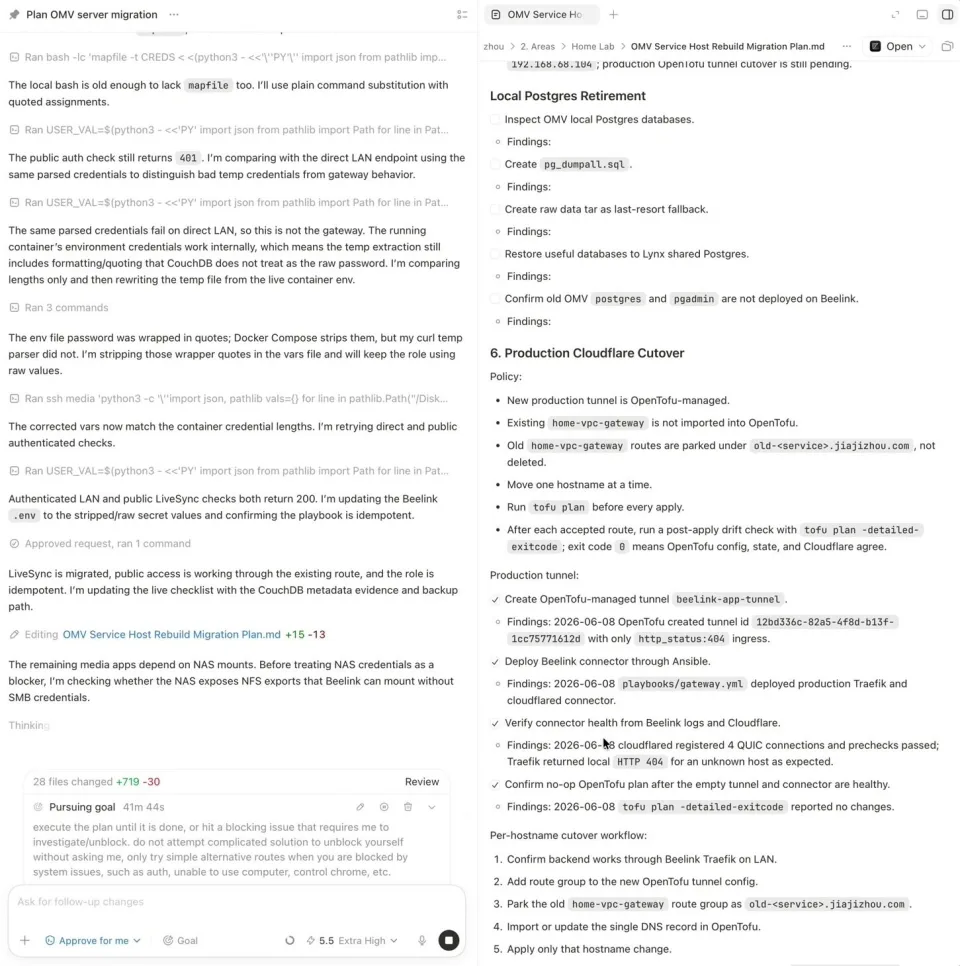
The agent worked through the service migration checklist directly in the plan, keeping the document as an execution log.
In the end, Codex counted two hours of execution to pursue the goal. The real wall-clock time was longer, because there were a few points where the agent needed me to make a judgment call or unblock something it could not safely decide on its own.
So, was it worth it?
Short answer: yes, and it wasn’t close. The migration was a success. The homelab is now more energy efficient, more reliable, more reproducible from source, and easier to reason about than anything I’ve run before.
It also gave me a more concrete way to use agents for complex workflows. The agent can own implementation details, but the route needs to be worked out with it: plan the sequence, refine the ambiguous parts, validate the risky steps, and make it record what it did as it goes. The loop that worked for me was simple: plan → refine → smoke-test → finalize → execute. Combined with /goal, it turned a scary weekend migration into something I could supervise instead of manually drive.
I also learned where the trust boundary belongs. The agent can inspect configs, write plans, run migrations, retry safe steps, and keep an operational log. I still keep the physical actions, secrets, destructive approvals, and service-shaping decisions. That split made the process feel safe instead of magical.
The main caveat is cost and tool fragility. Long sessions burn tokens, especially when Browser Use or Computer Use gets stuck and the agent starts chasing workarounds. The fix is to be explicit up front: if auth breaks, or a UI tool stops responding, stop and ask instead of improvising.
Things are not perfect yet, but this already changed how I think about managing the systems around me. The next time a disk dies or I want to add a service, it no longer feels like a weekend project. It feels like a goal, a plan, and a /goal.